COLOR CONTROL
Display adjustments
Fine-tune brightness, contrast, saturation, and hue to match your preferences.
Fine-tune your game colors and make every profile yours.
Simple controls. A look that feels right.
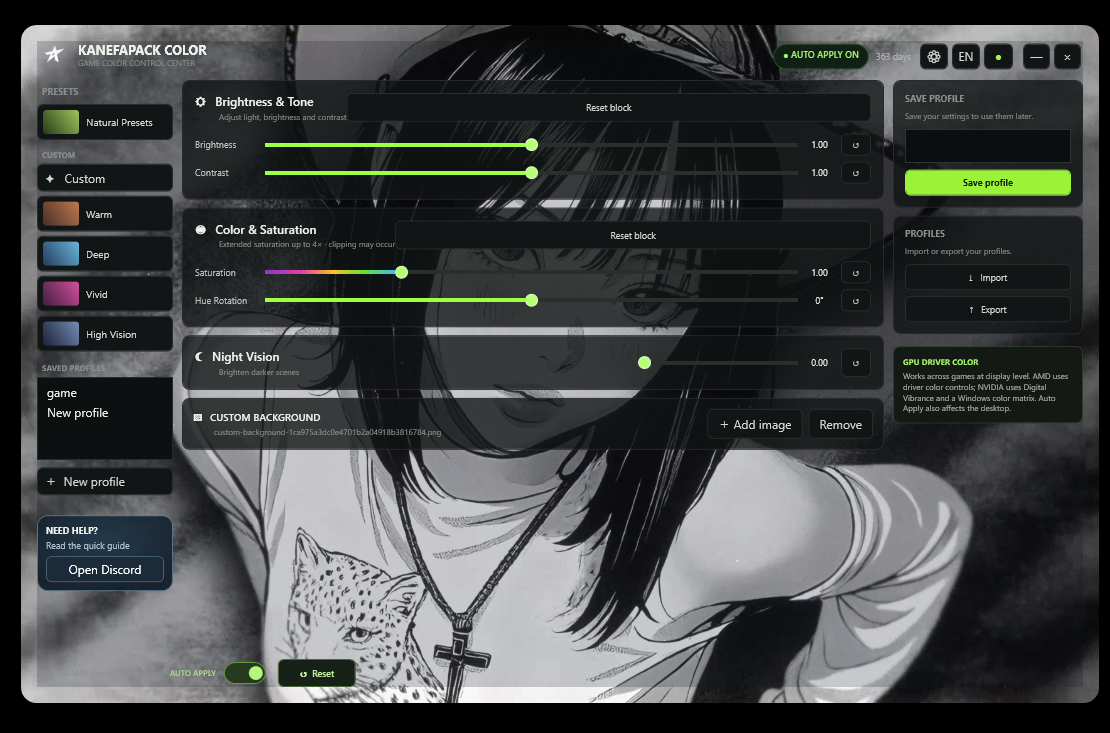
Everything you need to shape your colors and manage your profiles, all in one place.
Fine-tune brightness, contrast, saturation, and hue to match your preferences.
Start with a look you like, then adjust it to make the profile your own.
Adjust the look of darker scenes with a dedicated control.
Save your settings, then import or export profiles whenever you need.
Personalize the app with a background image of your choice.
Quick answers to common questions about Rufells Studio.
Rufells Studio is a game color control app for adjusting the look of your display and managing saved profiles.
The interface includes brightness, contrast, saturation, hue rotation, and Night Vision controls.
Yes. The app interface includes options to save, import, and export your profiles.
You can add a custom background image or remove the current one.
The download link will be added to this page once the installer file is available.
The installer download will be available here as soon as the application file is ready.